
ARTICLE · DESIGN SYSTEMS · MCP

711
variables audited
42
Figma pages
17
components
26
markdown files
There is a task every design systems person slacks off on.
You have a mature Figma library. Hundreds of variables, dozens of components, multiple token tiers. And at some point someone, usually you, needs to write proper documentation for it. Not the see-the-colors-page kind. The kind that tells a developer, or an AI code generator, what to use, when to use it, and what to never touch.
Then I spent one session combining Claude Code, the official Figma MCP, and TJ Pitre’s Figma Console MCP, and watched the whole thing get done in a way that genuinely surprised me. This is what happened.
A bit of context first
The library is production-grade: atomic design methodology, light and dark mode support, 15 variable collections. Components run from basic atoms like Button and Checkbox all the way up to full Navigation and Data Table organisms.
The goal was a Figma Make kit: a folder of structured markdown documentation that Figma Make and other AI code generators read before they touch any component. If you have used Cursor or Claude to generate UI, you know the output quality jumps when the AI has explicit guidance. What components exist, what tokens to use, which combinations are off-limits, which props are real.
Writing that documentation manually for a library this size is a two-week project if you are thorough. I gave it one Claude session.
Two MCPs doing two different jobs
A quick note on the tooling, because this confused me at first too.
Official Figma MCP
From Figma. Gives Claude design context for a specific node or selection. Great for component-level code generation: point it at a frame, it hands Claude structured data, Claude writes code.
Figma Console MCP
By TJ Pitre at Southleft. Treats your entire Figma file as a queryable API. It runs JavaScript against the Figma Plugin API, so you can traverse the full file, resolve alias chains, extract text styles, and read raw effect values in one conversation. 94+ tools, works on any Figma plan.
For documentation work, where you need to understand the system as a whole and not just one component, the Console MCP is the one you want.
Phase 1: The audit
I asked Claude to connect to the library and tell me what was there. The official MCP returned surface-level data. Then I switched to the Figma Console MCP, and the difference was immediate.
WHAT THE CONSOLE MCP RETURNED IN ONE TRAVERSAL
42
pages across Cover, Foundations, Molecules, and Application Components
15
variable collections, roughly 711 variables in total
51
text styles: 31 product-facing, 20 EightShapes annotation styles that should never appear in code
17
effect styles: elevation shadows, focus rings, and blur levels
Then I asked for a deep variable audit. The system has a two-tier architecture: a _Primitives collection with 165 raw values, and a Color Modes collection with 307 semantic tokens that alias into the primitives, with separate Light and Dark resolutions for every token. Claude traced every alias, confirmed the hex values, and flagged issues I had not caught myself.
BUGS THE AUDIT CAUGHT
Parentheses in token paths
The VisionIndigo (Primary) token group uses parentheses in its path. Parentheses are invalid in CSS custom property names, so all 13 tokens in that group would export as broken CSS variables. Figma renders them fine, so I had never noticed.
A one-letter typo
A shadow style was named Shodow-xl-blue instead of Shadow-xl-blue. One transposed letter, probably there since the file was created, that breaks the variable name in any export pipeline. The name is the key.
Phase 2: Building the documentation
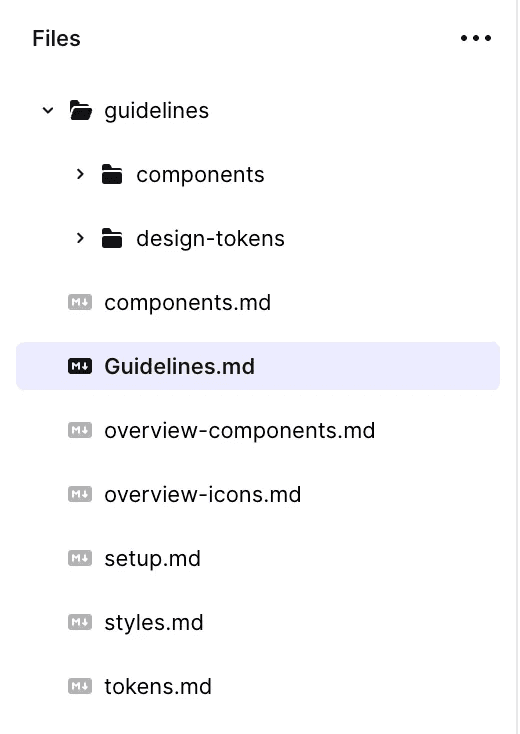
After the audit I asked Claude to produce a structured Make kit: a folder of markdown files organized so an AI code generator, or a new team member, could read them in a specific order and have everything they needed.
THE MAKE KIT STRUCTURE
Guidelines.md entry point, mandatory reading order
overview-components.md component inventory, decision trees
overview-icons.md icon system, slot props, sizing
design-tokens/
colors.md · typography.md · spacing.md · breakpoints.md · shadows.md
components/
button.md · badge.md · avatar.md · input-field.md · dropdown.md … 17 files
setup.md install, providers, Tailwind config, verification
Claude generated all of this from the audit data. Each component file followed the same template: Purpose, When to Use, When NOT to Use, Structure, Props, Variants, Usage Notes, and a complete working example.
What made it useful was the specificity. Not use a Button component, but there is no ghost or destructive type in this system; the types are Primary, Secondary, Tertiary, Blue Link, and Black Link. Not use the color tokens, but Colors/Text/Gray/text-primary resolves to #0e1116 in Light Mode and #fdfdfe in Dark Mode, and it should never be paired with Colors/Background/Secondary because the contrast fails at small text sizes.
The moment that made me stop
About halfway through, Claude caught something in the typography system. The initial audit had assumed, from a prior conversation summary, that the system used Inter. When Claude ran the actual Plugin API extraction, it came back with a correction: every one of the 31 product text styles uses DM Sans at Regular 400. No Inter anywhere. No Bold or Semibold weights in the styles at all.
Two files had already been written with the wrong font. Claude caught it, flagged it, rewrote the affected files, and documented the actual weight system.
The library uses a Font_Weight variable collection with four modes as a Figma authoring tool. But those weights are not in the text styles. In code, you derive the weight from the style name and hardcode it. The variable collection is a Figma-side convenience, not a token you export. The only way to get it right was to look at the actual file, not assume it from the collection structure.
What the [VERIFY] tags taught me
Throughout generation, Claude added [VERIFY] flags to anything it could not confirm directly from Figma: the npm package name, the stylesheet import path, Vite config, peer dependency versions. It was honest about what it knew versus what it was inferring.
At the end I asked Claude to go back through every file, find every [VERIFY] tag, run Figma queries to resolve as many as possible, and update the files. It ran three rounds of Plugin API queries. By the end, the only remaining flags were things that genuinely cannot be resolved from Figma: package internals, runtime behavior, and the icon library, because icon paths are stored as raw vector geometry, not metadata the Plugin API can surface.
The effect shadows were a good example. The initial docs had placeholder values. After verification, every one of the 17 effect styles had exact CSS.
shadow-sm
box-shadow: 0px 1px 2px 0px rgba(0, 7, 19, 0.06),
0px 1px 3px 0px rgba(0, 7, 19, 0.1);
That is the actual value from the Figma file. Not an approximation, not a guess at what a shadow-sm looks like in a common design system. The exact composition used by the team that built this library.
What this is, and what it is not
I want to be careful not to oversell this. Some people will read it and think: so AI can just document design systems now, designers are out of a job. That is not what happened.
What happened is that a tool that understands the Figma Plugin API deeply, combined with an AI that can reason about design systems and write coherent documentation, eliminated the mechanical part of the task. The traversal, the extraction, the formatting, the cross-referencing.
What it did not eliminate: knowing what good documentation looks like. Knowing which rules matter enough to surface. Knowing that spacing tokens are scoped to GAP in Figma but we use them for padding in code, and that is a known system debt worth documenting rather than silently papering over. Those judgment calls are still mine. The AI produced the output. I shaped what the output was supposed to be.
Claude Code plus Figma Console MCP is like having a very capable junior who can read the entire Figma file in two minutes and never makes a typo. You still have to know what to ask, and review what comes back. But the leverage is real.
The actual output
After the session I had 26 markdown files.
→
A top-level Guidelines.md with a mandatory five-step reading order for AI code generators
→
Token docs for colors, typography, spacing, breakpoints, and shadows, each with confirmed values, CSS patterns, and explicit prohibitions
→
17 component guideline files, each with confirmed variant matrices from the actual library
→
A setup.md covering install, provider wrapping, Tailwind config, and verification
→
A consolidated list of every known system bug, so no one accidentally ships the broken names
ONE HONEST CAVEAT
Five component files (Toast, Modal, Navigation, Tooltip, DataTable) still had [VERIFY] flags because no component set was found for them in the Plugin API traversal. Some of the most complex organisms exist as assembled layouts rather than published component sets, and the Plugin API cannot surface what is not there. Those files are structurally complete, but their prop API is inferred rather than confirmed. The honest response is to flag it and let someone fill it in.
Where this fits
Tools like Figma Make are getting better at using design systems correctly, but they need context to do it. A Make kit is that context: the layer between AI that knows how to write React, and AI that knows how to write React using your specific Button with the right token names.
This session showed me that building that layer does not have to be a manual documentation marathon. The information is in the Figma file. The tooling exists to extract it. The gap is just connecting those things in a way that produces output a code generator can actually use.
Big credit to TJ Pitre at Southleft for building Figma Console MCP and keeping it open source and actively maintained. Thanks to Richard and Umang for trusting me with these tasks.
WANT TO REPRODUCE IT
Claude Code, the official Figma MCP for component context, and Figma Console MCP in Local mode with the Desktop Bridge plugin for system-level extraction.
Find the Console MCP at github.com/southleft/figma-console-mcp.