

VUI Design System: The New Common.
ARTICLE · VOICE UI DESIGN SYSTEMS

Designed and open-sourced a voice-interaction layer for dense operations dashboards - six components, two new token families, a testable intent contract - plus an MIT-licensed skill that lets any team (or AI agent) add the same VUI to their own product.
Link: https://github.com/Aniruddha-Sainkar/relay-voice-ops
01 · THE SHIFT
Voice is becoming a must-have, and not through keynotes.
From late 2026, VUI is becoming a must-have experience in product design, and it did not happen through keynotes. It happened through tools like Wispr Flow, which let ordinary people feel the efficiency for the first time. You speak three to four times faster than you type, and the tool keeps up. Once you have dictated a full document faster than you could have written it, clicking through five dropdown filters on a dashboard starts to feel like dial-up.
Meanwhile, natural language on dashboards is already table stakes in BI. Power BI Copilot, Tableau Pulse, and ThoughtSpot Spotter all ship it, and realtime voice APIs have collapsed speech, reasoning, and reply into sub-second loops. The pieces are on the table. A design team planning for 2026-27 should stop treating voice as a feature request and start treating it as a modality, the same way we treat mobile.
3-4x
Speaking vs typing speed
4m → 15s
Time-to-insight, filters vs voice
1 breath
Max length of any read-back
02 · I LEARNED THIS THE PRACTICAL WAY
I shipped a voice layer on a dense operations dashboard.
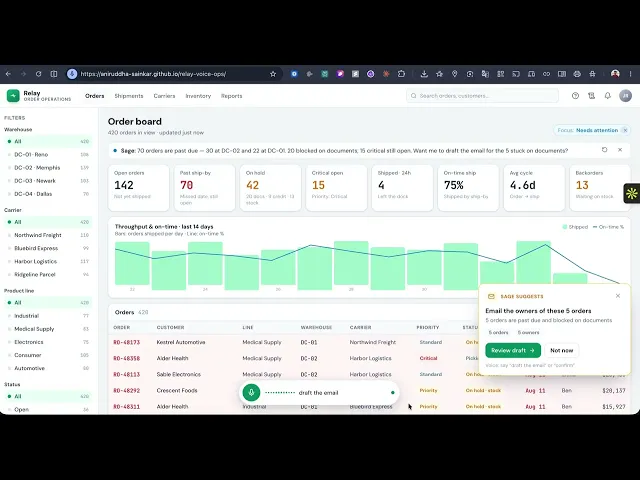
I recently designed and shipped a voice layer on top of a dense enterprise operations dashboard. Hundreds of rows, a dozen KPIs, multi-facet filters, and users who open it every morning with one question: what needs my attention today? Answering that used to mean click, click, click, scroll, squint. Four minutes, on a good day.
Now the operator just asks. The filters apply themselves, the relevant KPI cards light up and count up, charts animate to the filtered view, and a short spoken summary comes back: Fourteen past due, three blocked on documents. Then it proposes an action, and the human confirms before anything commits. Jarvis-like, but the dashboard stays the visual anchor.
Building it taught me something bigger than the feature itself: almost everything hard about voice is a design system problem. Here is what to consider.
03 · THE PRINCIPLE
Voice is not a feature. It is a layer in your system.
Most teams bolt voice onto a product. The mature framing is that voice is a modality your design system serves, with its own components, tokens, contracts, and governance rules. If your system can serve desktop and mobile from one source of truth, it can serve voice too. And if it cannot, voice will expose every inconsistency you have been living with.
The foundational rule comes from Google’s conversation design guidance and it has not changed: voice for intent, screen for information density. Voice is the fastest way to ask. The screen is the only sane way to show 251 rows. So never read a table aloud like a bedtime story. Read back the count and the exception, then stop. Amazon’s Alexa guidelines call this the one-breath test: everything the assistant says should fit in one breath.
04 · THE NEW PARTS OF YOUR SYSTEM
Six new components, two new kinds of tokens, one new contract.
A voice layer introduces genuinely new primitives, and they deserve the same rigor as your buttons. Six carried my entire build.
voice-dock
The persistent mic, with five visible states: idle, listening, processing, speaking, confirming. Plus a live transcript of what was heard.
spotlight-layer
Focuses the card being spoken about, synced to the speech. Three are blocked lands, the card glows. The magic lives here.
filter-chips
What the system understood, as removable chips. Your verification surface: a mishear is visible and fixable instantly.
action-card
The proposed next step, Draft an email to the owners of those three? Confirm by voice or click.
answer-strip
Every spoken word rendered as on-screen text, with replay. Nobody gets left out.
audit-drawer
The receipts: who asked what, what was parsed, what the human approved.
Conversation tokens.
The non-visual decisions are design tokens in every meaningful sense. Read-back templates are your typography. The persona, mine was a calm, precise analyst with zero chit-chat, no Sure! and no apologies, is your brand voice made literal. Confirmation phrasings, recovery lines, and confidence thresholds: keep them in one place and every surface inherits them. Scatter them as string literals and you get the conversational equivalent of hex codes hardcoded in forty files.
Motion tokens.
In a multimodal interface, animation is not decoration, it is half the answer. My working values: transitions at 200 to 400 ms ease-out, numbers counting up on a spring, spotlight dwell timed to the spoken segment, and a barge-in guard of roughly 250 ms so a cough does not interrupt the read-back. Respect prefers-reduced-motion. Standardize these and choreography becomes configuration, not new code.
The intent schema.
The deepest contract of all: a closed set of intents with typed slots, filter, query, compare, confirm, cancel, reset, help, is structurally identical to a component’s prop API. A menu, not a genie. It defines exactly what the system accepts, it is testable against misheard phrasings, and it self-documents: the things you can ask panel is generated from the schema, so help never drifts from reality.
05 · ADDING IT TO YOUR FIGMA SYSTEM
Extend the library you have. Do not fork a new one.
Everything above lands on Figma primitives your team already uses. The voice components should consume your existing spacing, radius, and type tokens, and only add what is genuinely new. Three moves cover most of it.
1. Tokens become variables.
Extend your semantic color collection with voice-state tokens (voice/listening, voice/speaking, voice/spotlight-glow); because they live in the semantic layer, they inherit your light and dark modes for free. Add motion values as number variables (motion/voice/transition: 250) so engineers read them in Dev Mode instead of guessing from redlines. And the underused trick: put your read-back templates and confirmation phrasings in a Conversation collection of string variables, bind text layers to them, then use collection modes as persona variants. A Concise mode and a Formal mode, and your entire mocked experience switches brand voice with one dropdown.
2. Components become variant sets.
The voice dock is one component set with a state property and five variants; interactive components with after-delay loops give you the listening pulse, and smart animate at your motion-token duration handles transitions. The spotlight is an overlay scrim plus a separate glow-ring component, so choreographing a new card is drop ring, point at card. Name every property exactly as the code prop is named, and write the component descriptions: that is your contract surfacing in Dev Mode.
3. Prototype the hero flow for theater.
Keypress trigger flips the dock to listening, after-delay to processing, smart animate to the filtered frame, overlay the spotlight, open the action card. Figma cannot hear or speak, and it does not need to: this prototype is your Wizard of Oz visual and your choreography review. The coded build is where the voice actually lives. Finish with one Voice Foundations page carrying the five-state diagram, the read-back rules, and the two governance lines every review checks: every voice action clickable, one source of truth.
06 · PLAN FOR FAILURE FIRST
It will get you wrong. Your design is judged by what happens next.
Anyone who has yelled at a smart speaker knows: speech recognition mishears. So design the unhappy path first. Repair, never dead-end. Do you want product X or product Y? beats I did not understand every time; two concrete options resolve faster than please repeat that.
Tier the confirmations by confidence. Very sure: proceed, Filtered to fourteen active orders. Half-sure: ask, Did you mean plant 0424? Lost: show the transcript and re-prompt. And always keep the touch option. Every voice action needs a clickable equivalent, and the GUI stays fully operable; a failed utterance never strands anyone, it hands them back the interface they already know. Keep an unknown-intent logger from day one; that log is your roadmap, written by your users, for free.
For anything that commits, sends, or flags: a two-step gate, always.
Proposal card, editable preview, explicit confirm. Nothing auto-sends. Ever. The assistant is a brilliant intern: it drafts, you sign.
07 · ACCESSIBILITY AND TRUST
The audit trail is not fine print. It is the trust model, surfaced.
Voice must be an addition, never the only path. W3C guidance is clear: alternative access when speech fails, spoken content as synchronized on-screen text, support for non-typical speech, full keyboard operability per WCAG. Done right, multimodal is more accessible than either mode alone. Hands-free opens the product to people the mouse excluded; the transcript, to people the speaker excluded.
If you design for compliance-heavy enterprise environments, there is a second layer, and it changed how I think about trust. There, every action must leave a time-stamped trail: who did what, when, and why, with AI-drafted content clearly marked and a named person approving every commit. That reads as bureaucracy; building with it, I realized it is the trust recipe written down. The audit drawer is the reason a careful, skeptical professional is willing to talk to a machine at all. Frame the human-in-the-loop gate as the feature. And mind the microphone: push-to-talk, a visible recording indicator, plain disclosure of what is kept and for how long. Voice recordings are personal data.
One rule ties it all together, carved in stone: one source of truth.
Voice and mouse write to the same state, and every spoken number is computed from the same data as the cards on screen, so the read-back can never disagree with the dashboard. The day it says fourteen while the screen shows twelve, trust is gone for good. That consistency is not polish. It is the whole ballgame.
08 · HOW TO ACTUALLY START
Do not start with code. Start with a script and a little theater.
Write sample dialogs for the happy path and the top five error branches, mapped to your product real filter model. Then run a Wizard of Oz test: your prototype on screen, a teammate secretly playing the assistant, a real user simply talking to the system. One afternoon will rewrite half your dialog. I promise. Only then build the vertical slice: one hero flow end to end, with the gate and the fallback working, and keep your speech engines behind adapters so you can swap them without touching the experience.
Voice-directed work has earned its keep in warehouses for two decades; it was simply too expensive for the rest of us. That just changed. The same loop, instruct, confirm, act, is now cheap enough for any dashboard. Teams that treat it as a design system layer will ship it repeatably. Teams that treat it as a feature will ship it once, badly, and blame the microphone.
The dashboard stays the visual anchor.
The voice just makes it listen.
BONUS · FOR MAKING IT THIS FAR
The VUI Design System Checklist
Run it against your own product; anything unchecked is your to-do list. Fewer than half checked means you have a voice gimmick. Most checked means you have built something people will actually trust and use.
FOUNDATIONS
✓
Voice scoped as a modality of the system, not a one-off feature
✓
Voice for intent, screen for information density
✓
Every voice action has a clickable equivalent
✓
Every spoken output has an on-screen text equivalent
✓
One source of truth: spoken numbers from the same data as the screen
✓
Product fully functional with voice unavailable
INTENT SCHEMA
✓
Closed intent set with typed slots, mapped to the real filter model
✓
Synonyms, aliases, and misheard forms handled
✓
Unknown is a designed intent, with a logger from day one
✓
Table-driven parser tests, including misheard variants
✓
Help content generated from the schema, never hand-written
COMPONENTS
✓
Voice dock with five visible states and live transcript
✓
Interpreted filter chips, removable, synced to shared state
✓
Spotlight synced to speech; dismissible, never traps focus
✓
Action card with rationale and voice hints
✓
Answer strip with replay
✓
Audit drawer and confirmation preview modal
✓
All spec’d as contracts and published to the library
CONVERSATION TOKENS
✓
Read-back templates: number first, exception, stop
✓
One-breath rule; never enumerate rows aloud
✓
Persona centralized; no filler, no apologies
✓
Recovery lines repair with options, never dead-end
✓
Confidence tiers set: implicit, explicit, re-prompt
✓
All versioned in one place, no scattered strings
MOTION TOKENS
✓
Transitions 200-400 ms ease-out; count-ups on a spring
✓
Spotlight dwell timed to spoken segments
✓
Barge-in guard around 250 ms of sustained speech
✓
prefers-reduced-motion respected everywhere
✓
Choreography is configuration, not bespoke code
FAILURE AND RECOVERY
✓
Unhappy paths designed before happy paths
✓
Low confidence: show transcript, ask, never guess
✓
Ambiguity: two concrete options, not open questions
✓
Cancel, edit, start-over at every step, voice and touch
✓
Barge-in supported; failure hands back the familiar GUI
CONSEQUENTIAL ACTIONS
✓
Two-step gate: proposal, editable preview, explicit confirm
✓
Nothing auto-sends or auto-commits, ever
✓
Exact action read back and displayed before confirm
✓
Every confirmed action writes an audit entry
ACCESSIBILITY AND PRIVACY
✓
No task requires speech; full keyboard path (WCAG)
✓
Spoken content as synchronized on-screen text
✓
Tested with diverse users, including non-typical speech
✓
Push-to-talk default; visible mic indicator
✓
Disclosure: what is processed, kept, and for how long
✓
Recordings treated as personal data (GDPR)
REGULATED ENVIRONMENTS
✓
Audit trail: who did what, when, and why
✓
Utterance and parsed parameters logged per action
✓
AI-drafted vs human-entered clearly distinguished
✓
Named, authenticated person behind every commit
✓
Human-in-the-loop framed as the feature
✓
Synthetic data for demos; sensitive-data boundary confirmed
/// END OF ARTICLE
Thanks for reading. If you try this on your own product, I would genuinely love to hear the first thing your users ask that you never saw coming.
A
Aniruddha Sainkar
Product Designer · AI-native UX & Design Engineering
I design AI-native product experiences: voice layers, agentic tools, and the design systems that make them repeatable. Work spans 0 to 1 startups, enterprise dashboards, and regulated healthcare UX.